Physics Lab is a rigid body workbench for the Mac. Draw linkages, gears,
rams and springs, run them, and read the answer off the board — speeds,
forces, energy, and the shape of it all over time.
macOS 14 or later · Native, no dependencies · Sends nothing anywhere
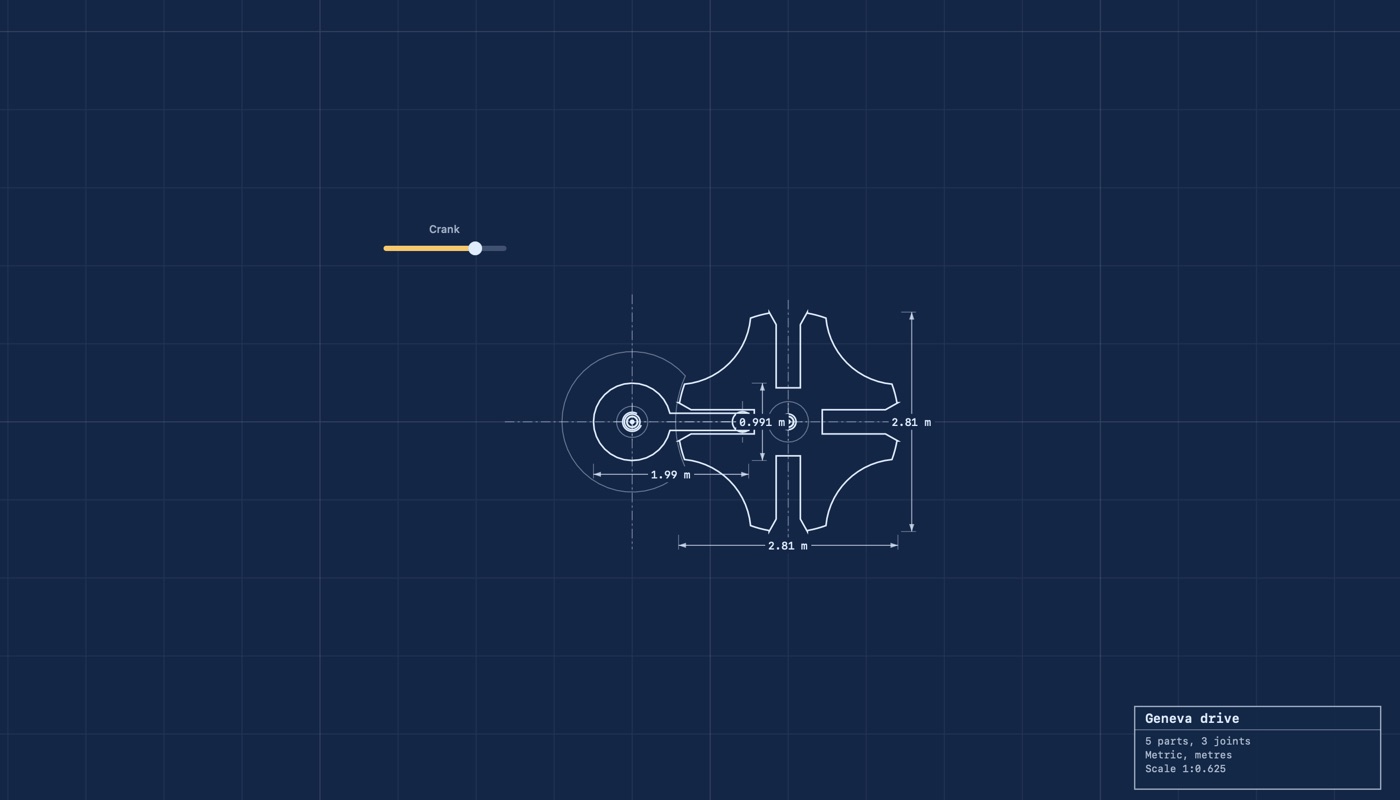
A pin on a crank turning a slotted wheel a quarter at a time. Every frame was worked out by the app.
A lab, not a sandbox
Plenty of apps let you drop shapes and watch them tumble. This one is
built round the question a mechanism actually raises: how fast, how hard,
how far, and what happens if I change this number?
Gears with real teeth
Involute spur gears specified the way gears are — module, tooth
count, pressure angle. They drive each other by touching, so a gear
that is physically blocked simply stops.
Measure everything
Position, speed, velocity, acceleration, angle, turning, momentum,
kinetic energy and potential energy, and contact force. As a number, a dial, or
a graph over time.
Forces and torques
Push a shape at a point, twist it, or both. Steady, or dying away.
Bind a slider, switch or button to it and work it while the board runs.
Every kind of link
Pins, rods, ropes, springs, dampers, welds, motors, rams, tracks
with ends, pulleys and belts. Gears mesh; belts reach across a gap.
Vary a number
Run the same board across a range and collect what came out — or ask
the other way round, and have it find the value that gives the answer
you want.
It draws like a drawing
Blueprint mode puts the board on paper, with the sizes and angles
called out and a title block in the corner. The same board, read a
different way.
Things that break
Give a shape a knock it can take, and hit it harder. It comes apart
into pieces that weigh between them what it weighed and carry on where
it left off.
Answers you can take away
Metric or feet and pounds. Export every reading as a table a
spreadsheet opens. Boards are documents, with autosave and versions.
A pendulum plotting its own speed. The period agrees with 2π√(L/g).
It draws like a drawing
Blueprint mode puts the board on paper: outlines, hatching on whatever is
fixed, a centre line through every part, the sizes called out with witness
lines and arrowheads, and the angle each bar lies at. It is the same board
and the same numbers — the drawing is a way of reading it, not a picture
of it.
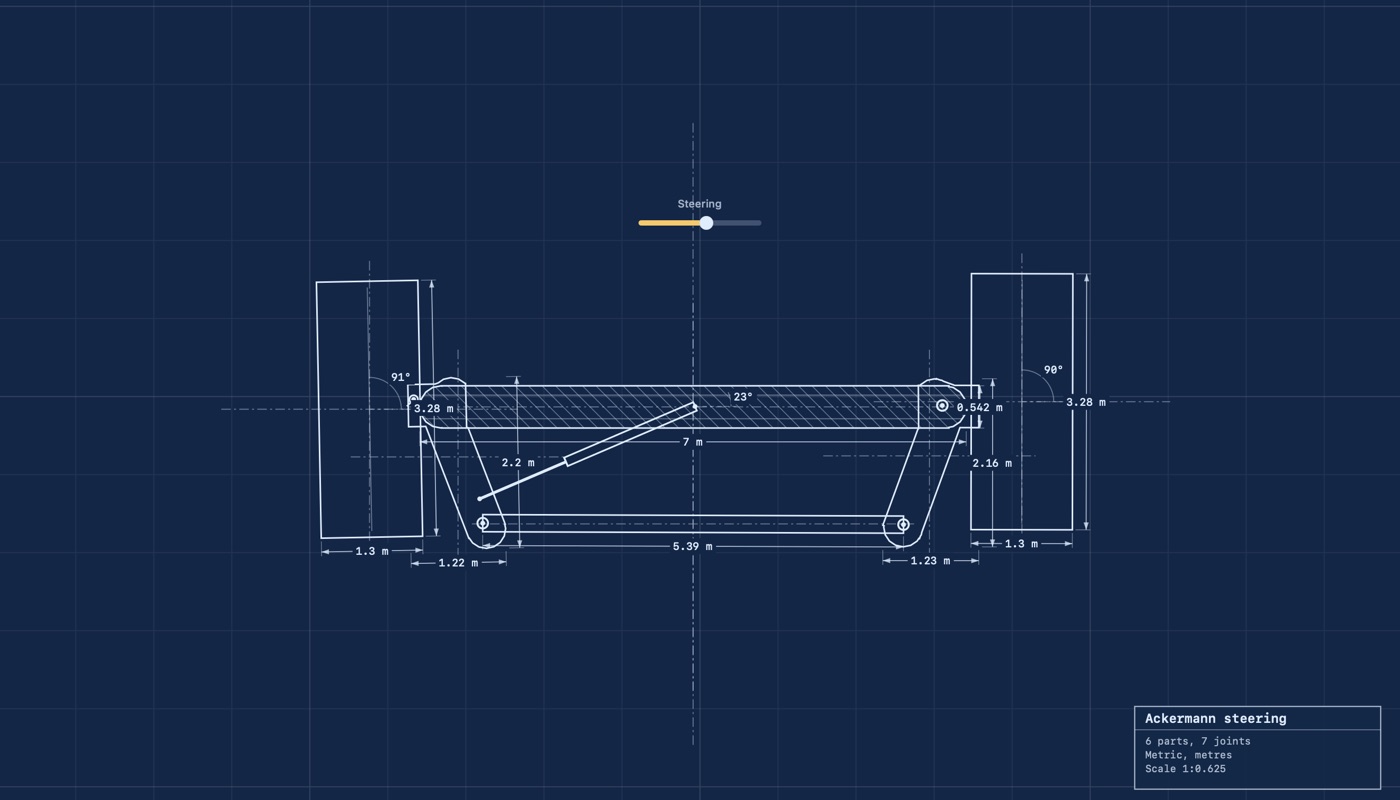
A Geneva drive, dimensioned.Ackermann steering, with the angles called out.
The physics, written down
Every topic this app can actually show you, one page at a time: what it
is, the numbers behind it, and the scene that runs it. Moments and
momentum, friction and rolling, gear ratios and involute teeth, the four
bar linkage, the slider crank, the Geneva drive, Ackermann steering,
orbits, springs, trusses.
The same words are in the app under Help, so they are there without a
network.
Guide
Enough to build something real in about five minutes.
Putting parts down
Pick a shape from the palette and drag it out on the board. Everything
snaps to the middles, corners and edges of what is already there, and to
the grid. Hold Shift to place it exactly where the pointer is.
A tool that makes something hands itself back to Select once it has.
Select, Erase and the backdrop stay on, because they are ways of working.
Drag on empty space to draw a box round several shapes at once.
⌘A takes everything.
Joining them
A hinge — pin, motor or weld — is clicked, not dragged. Click
where two shapes overlap and they are hinged there. Click over one shape
and it is hinged to the world, which is a bearing.
Rods, ropes, springs, dampers, rams, belts and pulleys are dragged
from one shape to another. One end may land in empty space, where the
world holds it.
Two gears of the same module: gather both and press Mesh. They are
moved to the right distance apart and phased so a tooth meets a gap.
After that nothing holds them together — the teeth do the work.
Measuring
Click a shape with the Meter tool. Choose what it reads in the panel,
and whether it shows as a number, a dial, or a graph over time.
Run the board. Export the readings from the File menu as a table.
The panel also tells you whether the mechanism can move at all,
counted from what holds what, before anything is run.
Correcting a shape
Double click any drawn shape, or press ⌘E, and it opens on its
own. Drag a corner to move it, click a line to put a corner on it, pick
one and press Delete to take it out. Two other things live in
that window:
Where the weight sits. Drag the cross. A shape cut
from one sheet of one material balances on its middle; a hammer does
not. Whatever you set is what the shape turns about and hangs from.
Points for things to attach to. Hold ⌥ and
click. A pin, rod or motor dropped near one lands exactly on it, and it
wins over a corner that merely happens to be nearer.
A ball and a gear both refuse to open. A ball has no corners; a gear's
teeth come from its tooth count and module, so one moved by hand would
only stop it meshing.
What things are made of, and what breaks
Steel, aluminium, wood, plastic, rubber and glass. A material sets the
density, friction and bounce together, and decides what a knock sounds
like — glass rings, wood knocks, rubber thuds.
Under Breaking, give a shape the hardest knock it can take. Hit it harder
and it comes apart into wedges about the point of the blow, which weigh
between them what it weighed and carry on doing what it was doing. None of
the pieces breaks again. A shape with nothing set never breaks, which is
how everything starts.
Magnets
Any shape can be magnetised, either way round. A magnet pulls on steel
whether or not the steel was ever told it was a magnet, and steel it has
hold of takes on some of the field and holds the next piece along: that is
how a string of them hangs from one bar. Take the magnet away and the
steel is ordinary steel again. Like poles push apart, and two pieces of
steel held in the same field push apart side by side and pull together
nose to tail, as two magnets do.
What may touch what
Two shapes joined by a pin, a weld, a motor or a slot do not knock into
each other — there is a switch on the link if you want them to. That does
nothing for a pair joined through a third, though, and a wheel on
a hub on a chassis has no link to the chassis. Set both to
ignore the same number: shapes that ignore the same number
pass through each other and nothing else. It is what "passes through
everything" should have meant, which is the other switch beside it and
does exactly what it says, including passing through the floor.
Several shapes as one
Gather shapes that overlap and press ⌘G. They become one
object: one weight, one middle to turn about, one thing to drag, and a
push on any of them moves all of them. Each keeps its own colour and
material, so a steel frame with rubber feet still grips like rubber.
⇧⌘G lets them go again. Merge is the other way to make one
thing out of several, and it cannot be taken back.
Setting numbers
Every number field can be dragged left and right as well as typed into,
and turned with the scroll wheel while the pointer is over it. Hold
⌥ for a finer step and ⇧ for a coarser one. A
number with a natural range, such as an angle, shows how far along it
is. Sizes are shown in whatever units the board is set to; the solver
always works in metres.
Building a board by describing it
Switched on under Settings, Tools, the app answers other programs on this
machine. An assistant that speaks the Model Context Protocol can then
build a board from a description: ask for a crank turning a rocker,
driven by a motor, and it puts the shapes down, joins them and runs them
while you watch in the window. Copy the recipe from the same pane into
the assistant's list of servers. What it makes is an ordinary board, to
correct by hand, save, or undo a step at a time.
It can put down balls, blocks, walls, ovals, gears and outlines of any
shape; join them with every kind of link, with its settings; mesh gears,
group shapes, run the board and take readings off it. It cannot open or
write a file, or reach anything beyond the board in front of you. The app
listens on this machine only, and does nothing until it is switched on.
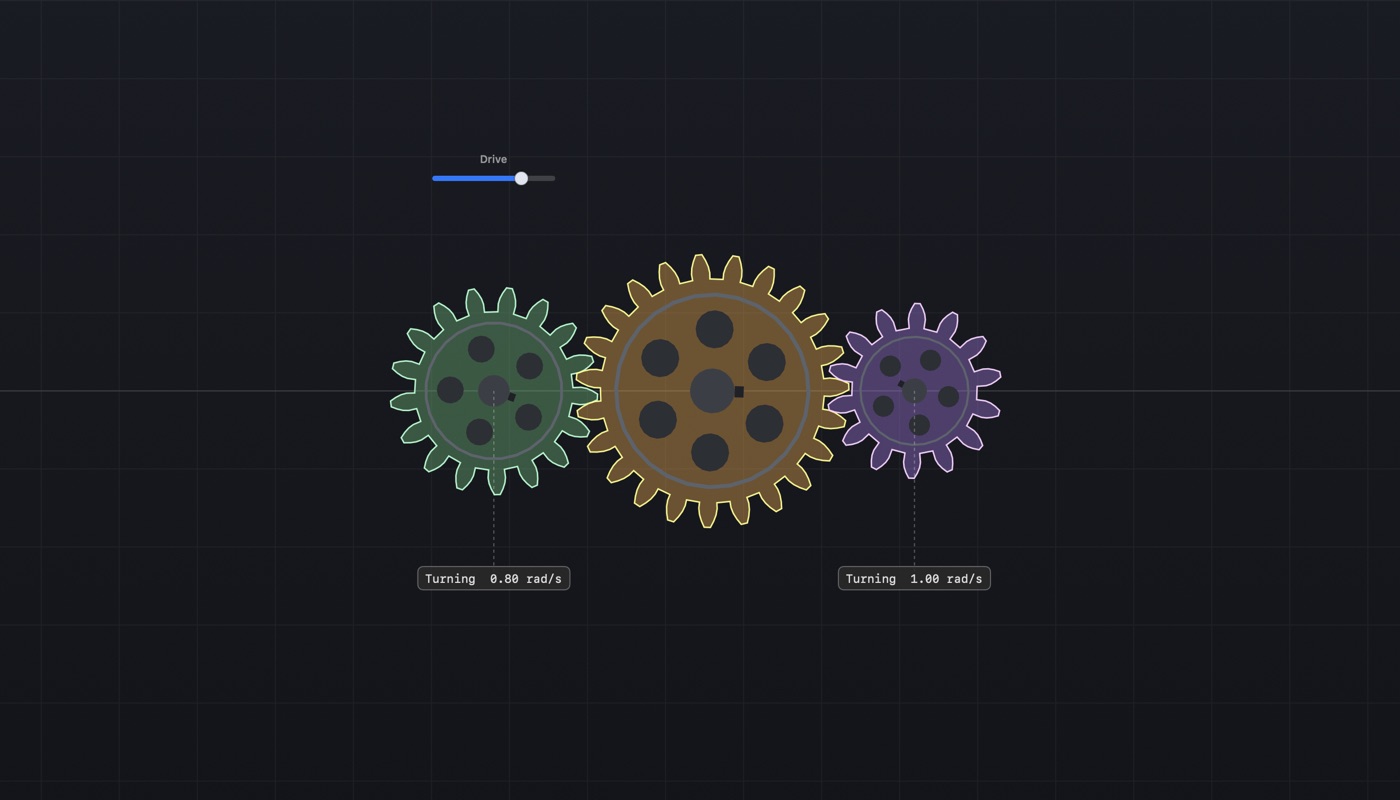
Two gears in mesh. Nothing binds them: their teeth touch.
Reference
Keys
Key
Does
Space
Play or pause
Delete
Remove what is picked, or take back the last corner while drawing
Esc
Drop the shape being drawn and go back to Select
Return
Close the shape being drawn
Arrows
Move what is picked by a tenth of a metre
⌘A
Gather every shape
⌘D
Duplicate
⌘R
Reset
⌘U
Merge — with ⇧ subtract, with ⌥ overlap
⌘G
Group — with ⇧ ungroup
⌘[⌘]
Turn left and right
⌥ drag
Move the view
⇧ while drawing
Ignore snapping
Blueprint
⇧⌘B, or the ruler in the toolbar. The board is drawn as a
drawing: outlines, hatching on whatever is fixed, a dash-and-dot centre
line through every part, the sizes called out with witness lines and
arrowheads, the angle each bar lies at, and a title block in the corner.
The numbers are the board's own — it is a way of reading it, not a picture
of it. Numbers that would land on each other are moved clear and given a
thin line back to what they measure, and a board of more than ten parts is
dimensioned only where you are working, because sizes on everything is
soup.
Taking a board somewhere else
Export a Page… writes one HTML file that replays the
board. Six seconds of a linkage comes to about thirty kilobytes. It
carries no solver: the motion is worked out here and baked in frame by
frame, so it plays anywhere and stays a recording rather than becoming a
second copy of the app.
Record writes a film of a run.
Export the Readings… writes what the meters saw as a
file of numbers.
Settings
Under the app menu. The grid: whether it shows, whether drawing lands on
it, how far apart it is, and how strongly it shows. The spacing is one
number rather than two — the grid you see is the grid you land on — and it
belongs to you rather than to any board.
What it simulates
Rigid bodies with separating axis collision, sequential impulses for
contacts and joints, and a second pass on positions so stacks do not sink.
The solver always steps by 1/120 s and banks the remainder, so the
same board behaves the same on any machine, whatever the frame rate.
Privacy policy
Physics Lab collects nothing.
There is no analytics, no telemetry, no crash reporting, no account, and
no advertising. Nothing you make is sent anywhere, and the app never
reaches out: it is sandboxed without permission to open a connection to
anything, so it cannot phone home even in principle.
There is one socket, and it is switched off. Under
Settings ▸ Tools the app can be told to answer other
programs on your own machine, so that something else — an assistant, a
script — can build a board, run it and read the answer. It listens on
the loopback address only, which is to say on this machine and nowhere
else: nothing on your network and nothing on the internet can reach it.
It does nothing until you switch it on, and stops the moment you switch
it off.
If you switch on Use a phone as a controller, also under
Settings ▸ Tools, the app listens over Bluetooth for your own phone running
Physics Lab. What the phone sends is how it is moving and which of its
buttons are held, and it goes no further than your Mac.
Everything you make stays in the documents you save, on your own machine
or wherever you choose to put them. Nothing is sent anywhere, because
there is nowhere for it to be sent to.
If that policy ever changes, this page will change with it and the reason
will be stated here.
Last updated: 11 September 2026.
Support
Questions, faults and requests are all welcome. The quickest way to get a
fault fixed is to say what you did, what happened, and what you expected
instead — and to attach the board file if you can.
macOS 14 or later. It is a native app with no dependencies and nothing
to install alongside it.
Does it work offline?
Always. The app never reaches out to anything, so being offline is
simply how it runs. It can be told to answer other programs on your own
machine, which is off unless you switch it on and is not a connection to
anywhere.
Can I get my results out?
Yes. Every meter's recording exports as a CSV table with a column of
times and one column per meter. Boards themselves are plain JSON
documents.
Can I use it in a classroom?
Yes. Each scene puts a question and answers it on the board, which is
what it was built for.